

Every social media manager has lived the same Monday: a content calendar in one tab, a design tool in another, a scheduler in a third, an inbox in a fourth, and a report that somehow has to come out of all of it. Viral Dashboard promises to collapse that mess into one login, with AI doing the heavy lifting.
It’s an appealing pitch. But “all-in-one” is one of the most overused phrases in software, so the real question is simple: does Viral Dashboard really work? I went through its pricing, refund terms, feature list and customer reviews, and a few details don’t line up the way the marketing suggests.
Managing social media can quickly turn into a full-time job. Between planning content, designing posts, replying to comments, publishing across platforms and tracking performance, even a small business can struggle to stay consistent.
That is the problem Viral Dashboard claims to solve. Its upcoming Live Reveal promises to demonstrate how one dashboard can plan 30 days of content, create posts, distribute them across 20 platforms, respond to comments and generate reports.
It sounds convenient—but does the software deliver enough value to justify paying for it?In this Viral Dashboard review, we examine the advertised features, published subscription plans, AI credit system, platform-support claims and customer feedback. We also highlight important questions to resolve before buying, so you can make a decision based on more than an impressive sales presentation.
What Is Viral Dashboard?
Viral Dashboard is an AI-assisted social media management platform developed by Webliska Technologies. It is designed to help creators, businesses and agencies manage multiple social accounts from one interface.
Rather than switching between different tools for scheduling, content creation, engagement and analytics, users can access several workflows through a single dashboard.
According to its official website, the platform includes features such as:
- Content planning: Organize upcoming posts with a content calendar and AI-generated strategies.
- Publishing and scheduling: Compose, schedule and manage social media posts.
- Bulk scheduling: Import up to 500 posts through CSV files, according to the product information.
- Engagement management: Use a unified inbox and AI-assisted replies.
- Creative Studio: Access AI-assisted design and content creation tools.
- Analytics and reports: Review performance and create reports, including white-label PDFs.
- Automation: Configure selected workflows and feed-based content processes.
- Link-in-bio pages: Create a destination page for links shared through social profiles.
The range of features is appealing, particularly for users managing multiple brands. However, having many tools in one dashboard does not automatically make a platform reliable, easy to use or cost-effective.
Those questions require closer examination.
How Does Viral Dashboard Work?
ViralDashboard is designed to bring the main stages of social media management into one workflow.
1. Connect your social accounts
You begin by connecting the social profiles you want to manage. The available features depend on the platform, account type and integration supported.
Once connected, you can organize your accounts and prepare content for publication.
2. Plan your content
The visual content calendar helps you organize posts across your publishing schedule. You can plan upcoming campaigns, manage drafts and coordinate content across different accounts.
For businesses that struggle with consistency, having a central calendar can make it easier to see what needs to be published and when.
3. Create captions and graphics
AI-assisted tools can help generate captions, suggest content ideas and create visual assets. These features can reduce the time spent starting from a blank page.
However, AI-generated content should still be reviewed. A caption that sounds natural on LinkedIn may not suit Instagram or TikTok, and generic graphics may not reflect your brand.
4. Schedule and publish posts
After reviewing your content, you can schedule posts for supported platforms. The goal is to reduce repetitive work and avoid logging into multiple accounts throughout the day.
5. Monitor engagement and performance
The platform also advertises engagement management and reporting features. These can help businesses review conversations and assess how their content performs.
The important distinction is that automation can simplify publishing, but it cannot guarantee reach, engagement or sales. Those outcomes still depend on your content, audience, offer and marketing strategy.
Viral Dashboard Features: What Stands Out?

Several features could make ViralDashboard useful, particularly for people managing multiple brands.
AI-assisted content planning
Planning a month’s worth of posts can take considerable time. ViralDashboard’s content strategy tools aim to make this easier by generating dated content plans and helping users develop ideas.This could be useful when you manage multiple clients or need to maintain a regular posting schedule.
The limitation is that AI-generated calendars may still need substantial editing. A local business, an ecommerce brand and a personal finance creator should not all publish the same style of content.
Multi-platform publishing
The platform’s website promotes publishing across multiple social networks from one calendar.This can be valuable when you repurpose content for different channels. For example, a business might adapt an educational post for LinkedIn, create a shorter version for Instagram and publish a video on YouTube.
However, supported features vary by platform. Check the official integrations page to confirm whether your required accounts support direct publishing, engagement management and analytics.
Unified inbox and AI replies
Responding to comments and messages can become difficult when conversations are spread across several accounts.A unified inbox may help centralize supported interactions. AI-assisted replies can also provide a starting point for routine responses.
For customer complaints, sensitive conversations or sales enquiries, human review remains important. Automated replies should not replace thoughtful communication.
Analytics and client reporting
Viral Dashboard advertises analytics dashboards and branded reports. These features may be especially helpful for freelancers and agencies that need to communicate results to clients.
Before relying on the reports, check which metrics are available for each connected platform and whether the data is updated at the frequency your workflow requires.
Viral Dashboard Pricing: How Much Does It Cost?
Viral Dashboard publishes subscription pricing on its official pricing page. The following figures reflect the plans currently displayed on the website at the time of writing.
| Plan | Monthly billing | Annual billing, effective monthly price |
|---|---|---|
| Creator | $19/month | $16/month |
| Pro | $49/month | $41/month |
| Business | $89/month | $74/month |
| Agency | $149/month | $124/month |
| White-Label | $299/month | $249/month |
The final annual payment is charged according to the annual billing terms, so check the checkout total rather than treating the effective monthly figure as the amount due immediately.
The official site also advertises a free trial. Its product page specifies a 14-day trial that requires a payment card. Confirm the cancellation deadline and applicable conditions before starting.
Which plan should you choose?
The right plan depends on how many accounts you manage and which features you need.
- Creator: Consider this if you manage a small number of accounts and primarily need content planning and publishing.
- Pro: May suit users who need greater capacity and more advanced workflow options.
- Business: Worth evaluating for growing teams managing several brands.
- Agency: Designed for agencies handling multiple client accounts.
- White-Label: Relevant to businesses that want to offer the platform under their own branding.
Do not choose a plan simply because it offers the highest number of profiles. Check user limits, brand limits, scheduled-post allowances and AI credits before deciding.
The AI Credit System: A Cost You Should Understand
Viral Dashboard uses credits for certain AI-powered actions. Its published pricing information lists the following examples:
| AI action | Published credit cost |
|---|---|
| 30-day content plan | 700 credits |
| Caption with three variations | 15 credits |
| Standard AI-generated image | 240 credits |
| AI layout suggestion | 28 credits |
Consider a hypothetical month in which you generate one content plan, request three caption variations for 30 posts and create one AI image for every post.
The estimated requirement would be:
- Content plan: 700 credits
- Caption generation: 450 credits
- Image generation: 7,200 credits
- Total: 8,350 credits
This is an illustrative calculation using the published figures, not an estimate of what every customer will spend.Your actual usage could be lower if you reuse existing graphics, write some captions yourself or generate images only when necessary.Viral Dashboard also offers additional credit packs. Check the current pricing page for the latest allowances and top-up prices, as these can affect the total cost of using the platform.
My recommendation is to estimate your monthly content volume before subscribing. A plan that looks affordable at first may become less attractive if your workflow depends heavily on AI-generated images.
Does It Really Support 20 Platforms?
ViralDashboard’s marketing mentions 20 platforms. The pricing FAQ, however, names 11: Facebook, Instagram, X, LinkedIn, TikTok, YouTube, Pinterest, Google Business Profile, Threads, Bluesky and Mastodon.
The other nine in the marketing material are Reddit, Tumblr, Telegram, WordPress, WooCommerce, Shopify, Vimeo, VK and Medium. Several are blogging or store platforms, so they may connect through integrations or RSS rather than native social posting. That’s plausible and not necessarily a flaw. But “20 platforms” and “11 platforms” are different promises, so if one of those nine matters to you, ask support how it works before paying.
Is Viral Dashboard Legit? What Customers Say
This is where the picture gets complicated. On Trustpilot, ViralDashboard holds a 1.7 out of 5 from 36 reviews. About 89% are one-star and 11% are five-star, with essentially nothing in between.
The Complaints
- Refunds: several reviewers say requests stalled or they were offered other products instead of money back
- Upsells: some describe extra paid add-ons after buying a one-time “lifetime” offer
- Functionality and access: login problems and features that didn’t work as advertised
The Praise
Positive reviewers describe a useful multi-brand scheduler. One reports using it for over four years on a one-time license across many brands, and others praise responsive support.
How to Read This Fairly
Thirty-six reviews is a small, unverified sample, and unhappy customers tend to review more often. Many complaints concern older lifetime-style offers, and your experience may depend on which offer you buy. Still, a near-perfect split between love and hate usually means results hinge on the details. The company also hasn’t publicly replied to the negative reviews, which doesn’t help its case.
The Refund Policy Mismatch
This one is easy to miss. The refund policy page states a 14-day money-back window, while the pricing page promises 30 days, no questions asked. The policy also excludes consumed AI credits and add-ons, and monthly subscriptions aren’t pro-rated.
I’m not suggesting anything improper, but two pages disagreeing is a good reason to screenshot the exact terms at checkout. If you buy through a third-party marketplace, its refund rules may apply instead.
Viral Dashboard vs. Buffer, Hootsuite and Sprout Social
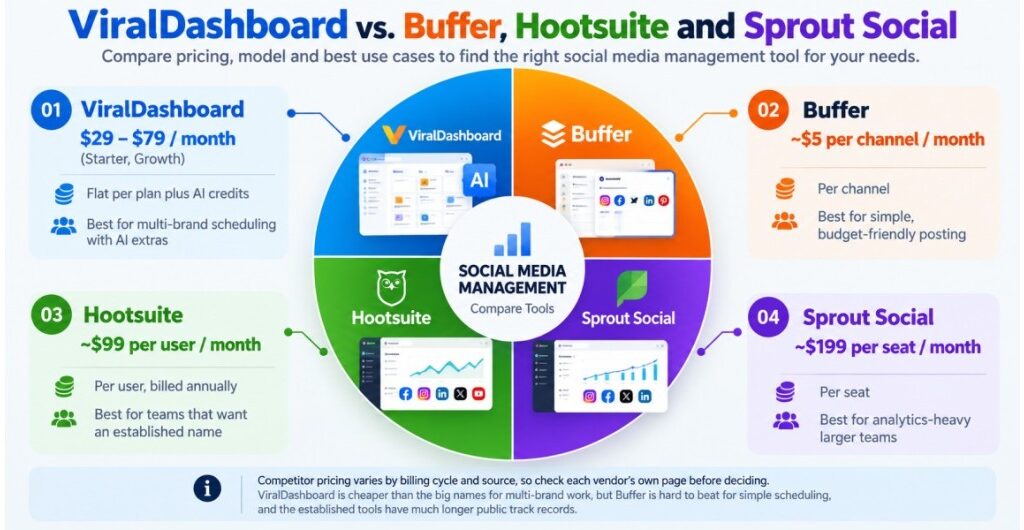
| Tool | Typical Entry Pricing | Pricing Model | Best For |
|---|---|---|---|
| ViralDashboard | $29 to $79 per month (Starter, Growth) | Flat per plan plus AI credits | Multi-brand scheduling with AI extras |
| Buffer | About $5 per channel per month | Per channel | Simple, budget-friendly posting |
| Hootsuite | About $99 per user per month | Per user, billed annually | Teams that want an established name |
| Sprout Social | About $199 per seat per month | Per seat | Analytics-heavy larger teams |
Competitor pricing varies by billing cycle and source, as this comparison and this one show, so check each vendor’s own page before deciding. One small flag: ViralDashboard’s comparison table lists Sprout Standard at $249, while most independent listings show about $199.
The fair read: ViralDashboard is cheaper than the big names on paper for multi-brand work. But Buffer is hard to beat for simple scheduling, and the established tools have much longer public track records.
Key Insights: Who Viral Dashboard Works For
It may work well if you:
- Manage several small brands and want one dashboard
- Are comfortable starting on the free plan before paying
- Want AI drafting and design help and will track your credits
Think twice if you:
- Need proven reliability for paying client work right away
- Are buying mainly because of income promises (the company’s own pages state there’s no guarantee of income)
- Can’t confirm the refund terms before paying
Pros and Cons of Viral Dashboard
Pros
- Combines several social media management functions in one interface.
- Offers AI-assisted captions and content planning.
- Provides a visual content calendar and scheduling features.
- Includes engagement and reporting tools.
- Offers plans for different types of users and agencies.
Cons
- AI credit usage can increase the overall cost.
- Platform features and integrations need to be checked individually.
- Public customer reviews include significant complaints about functionality and refunds.
- AI-generated content still requires human review.
- A large number of features may be unnecessary for users with simple scheduling needs.
Who Should Use Viral Dashboard?
Viral Dashboard may be worth considering if you manage multiple social accounts, create content for clients or want scheduling, AI assistance and reporting in one place.
It may be particularly useful for freelancers and small agencies that spend too much time switching between accounts and preparing routine reports.
However, it may not be the best fit if you need only basic scheduling, depend on a platform with a proven track record, or cannot risk disruptions to client campaigns.
If you’re considering it, start by listing your essential features. Confirm that the platform supports them, estimate your AI credit usage and test the workflow before relying on it for important business tasks.
Final Verdict: Does Viral Dashboard Really Work?
Viral Dashboard offers a broad collection of social media management features, including content scheduling, AI-assisted creation, engagement management and reporting. These capabilities could save time for creators, businesses and agencies managing multiple accounts.
However, the available evidence is not sufficient to confirm that every advertised feature works reliably for every user. Customer feedback is mixed, and the potential cost of AI credits deserves careful consideration.
We would not recommend buying solely because a platform promises to automate an entire month of social media work. Instead, verify its integrations, test the features you need, calculate the likely total cost and read the refund terms.
If ViralDashboard handles your real workflow effectively, it could become a useful part of your marketing toolkit. If you only need straightforward scheduling, compare simpler alternatives before spending more.
Ready to Explore Viral Dashboard?
Visit the official Viral Dashboard website to review its features, current plans and trial conditions. Make sure you understand the subscription terms and any additional AI credit costs before signing up.
Have you used ViralDashboard, or are you considering it for your business? Share your experience in the comments to help other readers make an informed decision.