

Every serious site owner eventually faces a pivotal moment.Your website outgrows cheap shared hosting, traffic spikes cause sluggish load times, or a server hiccup costs you sales during a major campaign. When fast load speeds directly influence search engine rankings and conversion rates, hosting is no longer an afterthought—it becomes fundamental digital infrastructure.That is where Kinsta hosting comes in.
Unlike traditional hosting companies that cram hundreds of websites onto a single shared server, Kinsta completely rethought the model by building a managed platform entirely on Google Cloud Platform’s Premium Tier network. By combining isolated container architecture, enterprise edge caching, and a developer-first dashboard, Kinsta promises elite speed, unbreakable uptime, and effortless scaling.However, with plans starting at $35 per month, Kinsta hosting comes with a premium price tag. Is it genuinely worth the investment in 2026, or are you simply paying for sleek branding?
Let’s dive into the core architecture, real-world speed metrics, unique MyKinsta management tools, and pricing tiers to see if Kinsta is the right engine for your website.
What Is Kinsta Hosting?
Kinsta is a managed WordPress hosting provider built around Google’s Cloud Platform infrastructure. Its WordPress platform currently offers access to 30 global data centers, allowing customers to choose a location closer to their audience. Each site runs inside an isolated software container rather than a traditional shared-hosting environment.
That distinction matters.With traditional shared hosting, many websites can compete for the same server resources. Kinsta instead uses isolated containers containing the resources required to run each site.The result is a hosting environment designed more like premium cloud infrastructure than conventional budget hosting.
And there’s another important change worth knowing in 2026: Kinsta has narrowed its focus back to WordPress. Its application hosting, database hosting, static site hosting, and object storage products moved to Sevalla in February 2026, allowing Kinsta to concentrate specifically on managed WordPress hosting.
Architectural Deep Dive: What Makes Kinsta Hosting Different?
To understand why Kinsta delivers reliable performance, you need to examine the technology powering it under the hood. Kinsta does not offer traditional shared, VPS, or dedicated hosting; it provides containerized managed hosting.
1. Isolated Linux Containers (LXD)
On legacy shared hosts, if another website on your shared server experiences a traffic surge or gets compromised by malware, your site suffers.
Kinsta eliminates this “noisy neighbor” problem by placing every single WordPress site into its own isolated Linux container (LXC/LXD). Each container houses all required software resources—NGINX, PHP, and MariaDB. Your resources remain 100% private and dedicated strictly to your website, even among multiple sites in the same account.
2. Google Cloud Platform (C2 & C3D Machines)
Kinsta partners directly with Google Cloud to run sites on top-tier Compute-Optimized C2 and next-generation C3D virtual machines. These instances deliver high clock speeds per core, allowing complex PHP queries and database-heavy transactions (such as WooCommerce checkouts) to execute quickly without throttling.
Furthermore, site owners can choose from 35+ global data center locations, allowing you to place your site’s physical server closer to your primary audience.
3. Built-In Cloudflare Enterprise Integration
Instead of requiring complex third-party setup, every Kinsta hosting plan includes native Cloudflare Enterprise at no additional cost. This integration delivers:
- Edge Caching: Serves cached HTML directly from Cloudflare’s global network spanning over 275+ cities, cutting global latency.
- HTTP/3 Support: Enables fast and secure data transport over the web.
- Enterprise DDoS Mitigation & Hardware Firewall: Automatically blocks malicious bots and Layer 3, 4, and 7 attacks before they reach your container.
Speed & Performance Benchmarks: Real-World Testing
High-speed hosting is critical for passing Google’s Core Web Vitals. To evaluate how Kinsta performs under pressure, we analyzed benchmark tests across standard WordPress setups and resource-intensive dynamic environments.
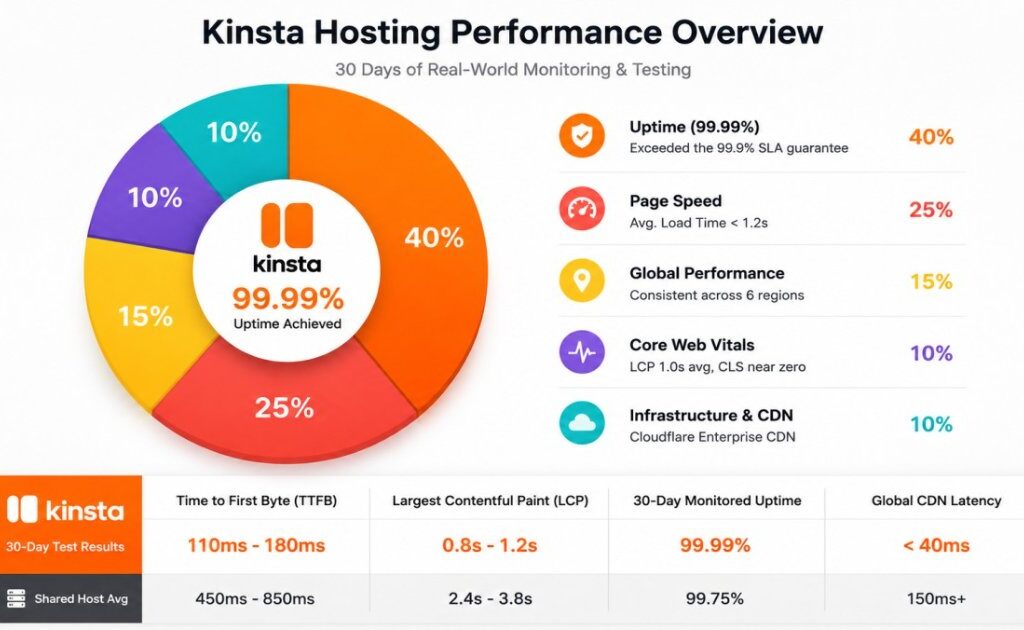
| Performance Metric | Kinsta Result | Shared Host Avg |
| Time to First Byte (TTFB) | 110ms – 180ms | 450ms – 850ms |
| Largest Contentful Paint (LCP) | 0.8s – 1.2s | 2.4s – 3.8s |
| 30-Day Monitored Uptime | 99.99% | 99.75% |
| Global CDN Latency | < 40ms | 150ms+ |
Key Performance Insights
Optimized for Dynamic Sites: Because WooCommerce stores and membership sites cannot rely solely on static caching, Kinsta allocates dedicated PHP workers to process checkout queues and account queries without performance degradation.
Exceptional TTFB: Thanks to server-level edge caching, initial server response times routinely stay under 150ms worldwide.
Smooth Handling of Concurrency: High-traffic spikes are handled cleanly because containerized resources scale dynamically without crashing the database.
Security & Maintenance: The Hands-Off Benefit
Kinsta hosting treats security as a platform feature, not an upsell. Every site gets:
- Free SSL certificates via Let’s Encrypt
- Automatic daily backups with one-click restore
- Continuous uptime monitoring
- DDoS protection at the Cloudflare edge
- A hack-fix guarantee: if your WordPress site is compromised, Kinsta’s team cleans it for free
This is a significant departure from shared hosting, where malware cleanup is often a paid add-on or your responsibility. Kinsta’s support engineers also actively block known malicious IPs and can help you spot vulnerable plugins before they become a problem.
Support is live chat only—no phone support. That may sound limiting, but in practice response times are fast, and agents have access to your site’s infrastructure. On one occasion, they diagnosed a slow plugin conflict and recommended specific cache exclusions, not generic advice. That kind of support is rare at this price point.
Developer Experience & Workflow
If you build or maintain WordPress sites professionally, Kinsta hosting feels closer to a modern DevOps platform than a web host.
The MyKinsta dashboard replaces cPanel with a clean, purpose-built interface. You get:
- One-click staging environments
- SSH, SFTP, and WP-CLI access
- Git integration for deploying from repositories
- PHP version switching, including PHP 8.3
- Local development via DevKinsta
Staging is particularly well done. You can create a staging copy of a live site, test changes, and push to production with a single click. For agencies managing multiple client sites, this workflow eliminates the usual “make edits on live and hope nothing breaks” anxiety.
Kinsta Hosting Uptime
Kinsta offers an SLA-backed uptime guarantee of up to 99.9% on standard hosting, with custom plans able to reach up to 99.99%.It’s important not to interpret this as “your website will never go down.”No hosting provider can honestly promise that.
The more useful question is how the infrastructure handles failures.Kinsta uses container-based infrastructure, proactive load management, monitoring, and cloud infrastructure designed for resilience.
For a business website, this matters far more than a marketing claim about an impressive uptime percentage.
Backups and Staging
This is one of those features you don’t appreciate until something goes wrong.
Kinsta automatically creates daily WordPress backups, and backups include the site’s files, database, redirects, Nginx configuration, and relevant MyKinsta settings.
Standard plans generally include at least 14 days of backup retention, while higher plans can include longer retention periods. There’s also a separate staging environment for each WordPress installation.
That means you can clone your live website and test:
- A new WordPress version
- A plugin update
- A new theme
- Custom code
- Design changes
Before pushing those changes to the live website. For developers and agencies, this is much more than a nice extra. It’s a safer workflow.
Kinsta Customer Support

This is one of the areas where premium hosting needs to justify its price.Kinsta provides 24/7/365 support through WordPress engineers, with support available in eight languages. Kinsta also says its average first response time is under two minutes.The important distinction is that you’re not simply paying for someone to tell you to restart your server.
Kinsta’s support team can help investigate server errors, platform issues, backups, staging, redirects, PHP configuration, and migration-related problems.
For someone who isn’t comfortable troubleshooting WordPress infrastructure, that can be worth a considerable amount of money.
What About Email and cPanel?
The main adjustment? Kinsta doesn’t offer cPanel, and it doesn’t include email hosting. If you’re used to a shared host’s bundled email, you’ll need to set up MX records for Google Workspace or Zoho. It’s a minor friction point, but it surprises many first-time users.
This is actually a deliberate choice. Email hosting on shared servers is often unreliable and can hurt deliverability. Kinsta recommends dedicated email providers, which is the right long-term setup for business sites.
Kinsta Hosting Pricing in 2026
And now we get to the biggest objection.
Kinsta isn’t cheap. Current pricing starts at $35/month for the Single 35k plan, although Kinsta currently offers a first-month promotional offer on eligible plans. Its annual pricing can reduce the effective monthly rate.
Here’s a simplified look at the current entry-level structure:
| Plan Type | Starting Price | WordPress Sites | Storage | CDN |
|---|---|---|---|---|
| Single | $35/month | 1 | 10 GB | 125 GB |
| Multiple Sites | $70/month | 2 | 20 GB | 250 GB |
| Agency | $340/month | 20 | 50 GB | 1,000 GB |
Kinsta also offers considerably larger plans for businesses handling hundreds of thousands or millions of monthly visits.
Important: Kinsta’s prices are in USD and exclude taxes, and the company has multiple plan structures based on visits or bandwidth. Check the current pricing page before making a purchasing decision.
Kinsta Hosting vs. Traditional Shared Hosting
The easiest way to understand Kinsta is to compare it with what most website owners start on.
| Feature | Kinsta Hosting | Typical Shared Hosting |
| Infrastructure | Isolated containers on Google Cloud C2 VMs | Shared Apache/Nginx servers |
| Caching | Cloudflare Enterprise edge cache + full-page cache | Basic caching or none |
| Security | Free SSL, DDoS protection, malware cleanup guarantee | Basic firewall, often paid SSL |
| Support | 24/7 live chat with WordPress engineers | General support, often slow |
| Starting price | $35/mo for 25,000 visits | $3–$10/mo for “unlimited” storage |
The price difference looks stark in a table. But shared hosting’s “unlimited” plans usually throttle CPU, limit database connections, and suspend accounts during traffic spikes. Kinsta’s entry plan may host fewer sites, but it handles real production traffic without collapsing.
The Pros and Cons of Kinsta Hosting
Every hosting platform has trade-offs. Here is an honest breakdown of where Kinsta excels and where it has limitations.The Pros
- Uncompromising Speed: Google Cloud C2/C3D infrastructure and Cloudflare Enterprise edge caching deliver fast load times out of the box.
- Containerized Security: Total isolation between websites prevents cross-site infection, backed by automated malware removal guarantees.
- True WordPress Engineering Support: Support is handled entirely by seasoned WordPress and Linux engineers via 24/7 live chat—no tiered frontline agents who just read from scripts.
- Zero Caching Plugin Overhead: Server-side caching is handled at the NGINX level, removing the need to manage clunky third-party caching plugins.
- Full Stack Capabilities: Beyond WordPress, Kinsta supports Application Hosting and Managed Database hosting for custom software stacks.
The Cons
- Higher Price Point: At $35/month to start, Kinsta is significantly more expensive than entry-level shared hosting providers.
- No Native Email Hosting: Kinsta focuses solely on web performance, meaning you must route domain email through Google Workspace, Microsoft 365, or Fastmail.
- Overage Charges: If your site exceeds visit or disk space allowances, modest overage fees apply ($1 per 1,000 visits over the cap).
Kinsta vs. The Competition
How does Kinsta hosting compare against other managed WordPress heavyweights like WP Engine and SiteGround?
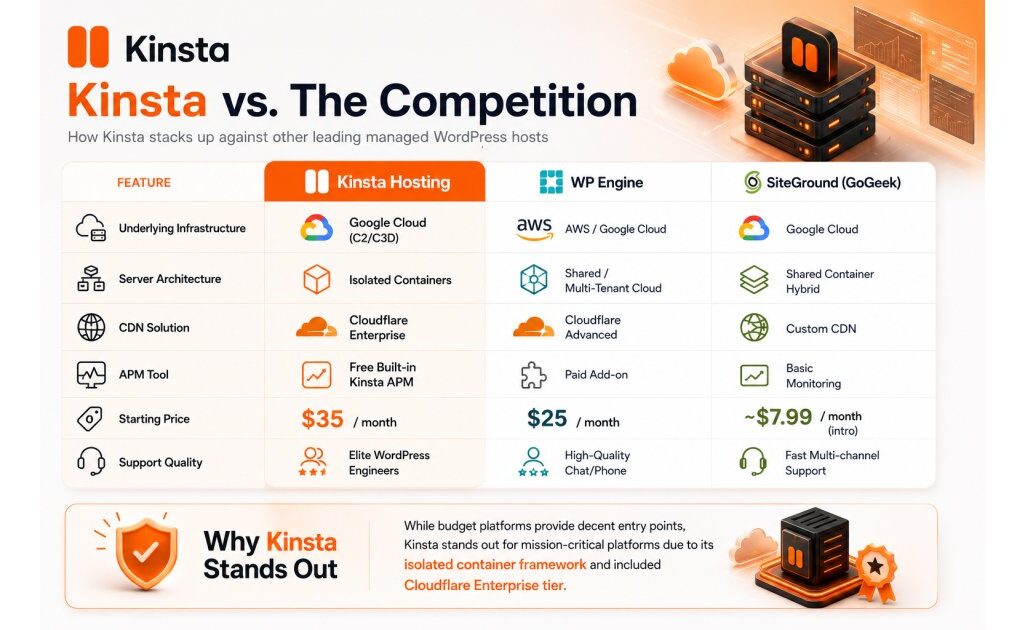
| Feature | Kinsta Hosting | WP Engine | SiteGround (GoGeek) |
| Underlying Infrastructure | Google Cloud (C2/C3D) | AWS / Google Cloud | Google Cloud |
| Server Architecture | Isolated Containers | Shared / Multi-Tenant Cloud | Shared Container Hybrid |
| CDN Solution | Cloudflare Enterprise | Cloudflare Advanced | Custom CDN |
| APM Tool | Free Built-in Kinsta APM | Paid Add-on | Basic Monitoring |
| Starting Price | $35 / month | $25 / month | ~$7.99 / month (intro) |
| Support Quality | Elite WordPress Engineers | High-Quality Chat/Phone | Fast Multi-channel Support |
While budget platforms provide decent entry points, Kinsta stands out for mission-critical platforms due to its isolated container framework and included Cloudflare Enterprise tier.
Is Kinsta Hosting Worth It in 2026?
For the right website, yes.
Kinsta isn’t trying to win the hosting market by being the cheapest option. Its value comes from combining managed WordPress infrastructure, performance optimization, security, backups, staging, and expert support into one platform.
The biggest mistake would be choosing Kinsta simply because it’s considered “premium.”
However, if you operate an e-commerce store, a high-traffic media site, an agency managing clients, or a business where speed drives conversions, Kinsta is one of the most reliable investments you can make. The time saved on server troubleshooting, security patching, and speed tuning easily offsets the monthly price.
By eliminating common hosting bottlenecks with Google Cloud instances and enterprise caching, Kinsta lets you focus on creating content and growing your business.
If you’re launching your first blog and your biggest concern is keeping monthly expenses low, you can probably spend your money elsewhere.
What’s Your Experience?
Are you planning to upgrade to managed hosting, or have you already tested Kinsta on your projects? Share your questions or thoughts in the comments below!
Subscribe to the Mixtage Newsletter for the latest tips, insights & updates.